Notices and maintenance
This page explains what you’ll see when Write has something to tell you, and what happens when Write is paused for maintenance. Your words are safe throughout.
Notices
When Write posts a notice, it appears in one or both of two ways.
A bar across the top of the page. It carries the notice’s title and message, with an icon for how serious it is: ⓘ for information, ✦ for a notice, ⚠ for a warning and ⛔ for an outage. Only an outage turns red. Click the × to dismiss a bar; Write remembers that for your account in this browser. Up to three bars show at once, most serious first.
A dialog that opens once. It shows the notice and a Got it button, with the reminder “You’ll see this once.” If several are waiting you get one dialog headed “A few notes from Write.” Write remembers what you’ve seen in this browser, so another browser or device may show it again. Signing out clears that memory.
 The top of a page with a warning bar across it, showing the ⚠ icon, a short title, a sentence of message and the × at the right.
Some notices are meant for particular roles—owners, say—so you may not see one a co-author does. Maintenance notices go to everyone.
Before a maintenance window
Now and then Write is paused for a short time while it is looked after. You get warning in steps:
- About a day ahead, a bar appears: the title, then when it starts and for how long—“Starts in 5 h (Tue 9:30 PM), about 30 min.” You can dismiss it until the last hour.
- Within an hour, a dialog opens once: “Write will pause at 9:30 PM,” with a Got it button and a note that one more reminder is coming. From here the bar can’t be dismissed.
- Within ten minutes, a last dialog: “Write pauses at 9:30 PM.”
- In the final minute, Write saves anything you’ve typed, so there is nothing to do. The bar counts down: “Write pauses in 0:58; your work is saving now.”
Times are in your own clock and written the way your browser writes times, so you may see “9:30 p.m.” or “21:30” instead of “9:30 PM.” If you open Write after one of the reminders was due, you see only the ones still ahead.
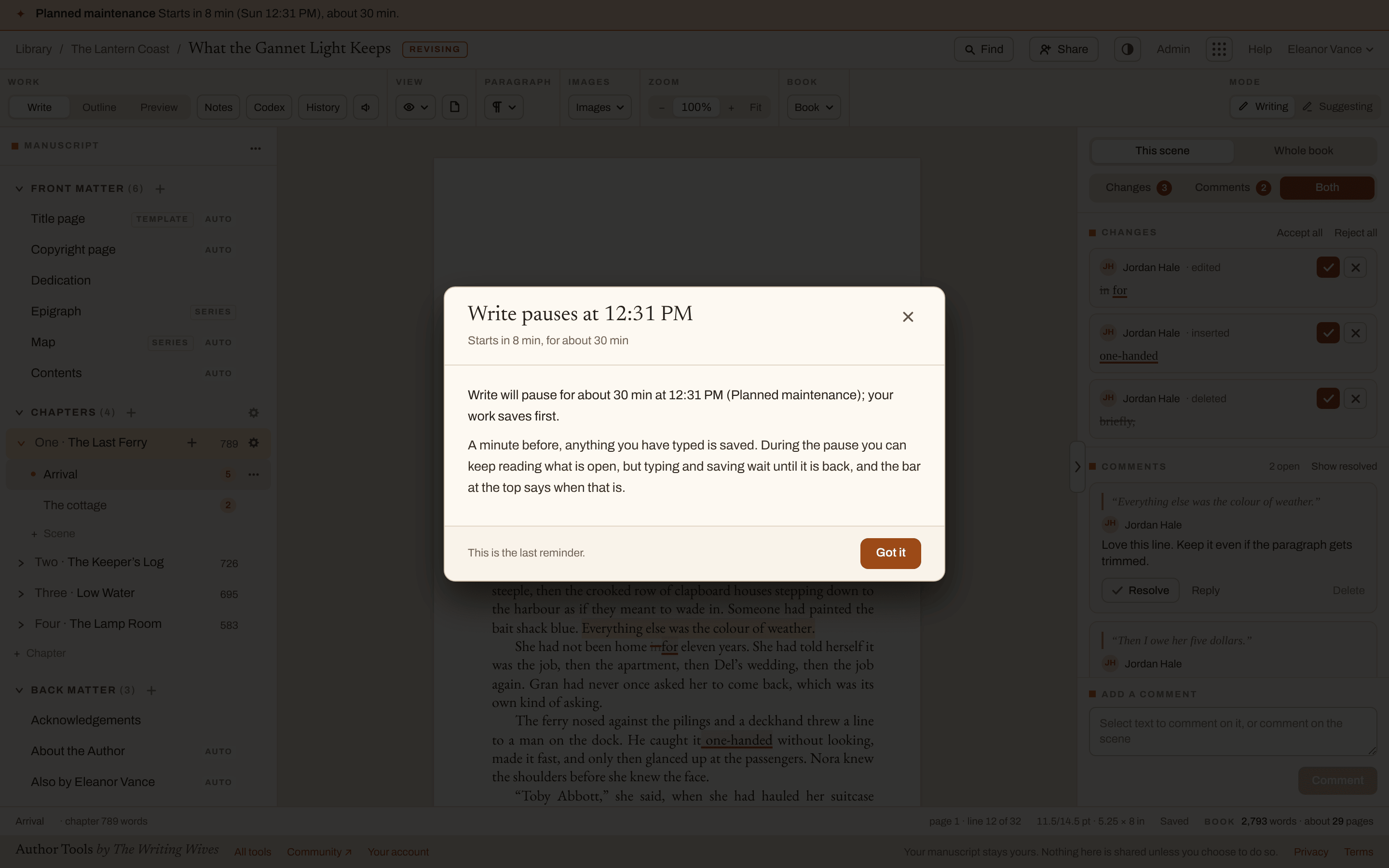 The “Write pauses at …” dialog over a book, with the Got it button and the line “This is the last reminder.”
While Write is paused
The bar turns calm and says “Write is being looked after, back by 9:30 PM,” with the minutes left. It can’t be dismissed. What changes:
- The page is read-only. What’s on your screen stays readable, but you can’t type. Anything already typed stays put and saves when the window ends.
- Changes are held. Moving chapters or scenes, notes, the codex, restoring a version, inserting pictures and replying to comments wait too. In the toolbar, Details, Page setup, Publish and the Library button under Images are greyed out; on a computer, point at one and it reads “Paused for maintenance: back when the window ends.” On a phone, the owner and co-author entries leave the More sheet until the window is over (Write on a phone or tablet).
- The save indicator says so. Where you’d see Saved, it says Paused for maintenance.
- A refused change tells you why: “Write is paused for maintenance until about 9:30 PM.” The time is in your time zone.
- New pages won’t load. Open Write fresh during a window and you get a screen titled “Write is being looked after,” with the time it’s back. It reloads on its own.
If the work takes longer than planned, the bar says so—“it is running a little long. Your words are safe where they are”—and a refused change reads “Write is still paused for maintenance, running a little past 9:30 PM.”
The Library
If the Library can’t show your books during a window, it says “Your books are safe, just out of reach for a moment,” and fills in again by itself when the work is done. Nothing has been removed.
When it’s over
You don’t need to refresh. From an hour before a window, Write checks every half minute. When the window ends the bar goes, the greyed buttons come back, typing returns, anything waiting is saved, and the Library reloads.
If you work with an AI assistant
An assistant connected to Write hears about notices too (What an AI can and cannot do in your books):
- When it connects, it’s given the current notices and any coming window.
- For the hour before a window and during it, and for any live warning or outage, each result it gets carries a one-line notice. Times there are in UTC.
- During a window, every request it makes is refused with a maintenance message and the time Write is back, and it is told not to retry in a loop. Reads are refused too, not only edits.
Good to know
- Pausing is planned and lifts by itself. You never have to end it.
- If a save is refused just as a pause begins, your words stay on the page and in your browser, and Write saves them as soon as the window ends.